
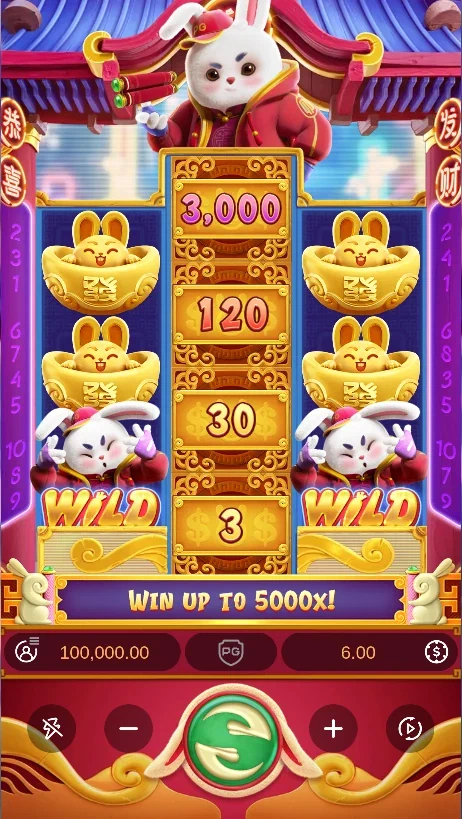

Find the controls below the reels#
The Fortune Rabbit demo places the bet display and spin controls beneath the rabbit’s reel frame. Identify those controls before starting a sequence. Bet Amount opens the stake settings; Spin begins a round using the current selection. The menu brings the paytable, rules and other settings into the same game window.

Use a single spin for your first look. When the reels settle, trace a winning line from the leftmost reel to the right. Then look for numbered Prize symbols and count them across the whole grid. The Fortune Rabbit overview introduces both award types, while the detailed rules show how their amounts are calculated.
The screen image represents one demo state. Your own sequence produces its own symbols and results. Use the picture to locate controls and recognise the game, then read the result displayed in the active client.
Use the game window on your device#
On a phone, use the controls beneath the reels. The game stays inside this page while the surrounding guide remains available below it. On desktop, click inside the game before using its keyboard controls. Use the game menu to open Rules or Paytable and Close to return to the reels.
For a guided exercise, follow the free-play walkthrough. It gives you a short sequence for checking the stake, reading a line and comparing a Prize amount with the total bet. Keep the how-to-play instructions nearby when trying Auto Spin or the desktop Space-key controls.
Decide where to continue#
Return to individual spins whenever you want time to inspect the menu. Paytable shows combinations and payout values; Rules describes the controls and the feature conditions. Once those screens are familiar, use game access to explore the partner’s game options and the distinction between game controls and an operator account.