

Set Bet Size, Bet Level and the total amount#
Fortune Rabbit uses ten fixed bet lines. Bet Size and Bet Level combine with those lines to produce the total stake: Bet Size × Bet Level × 10. In Bet Options, you can scroll the individual selectors or choose through Bet Amount. The plus and minus controls give you another way to adjust the total from the main screen.
Max Bet sets Bet Size and Bet Level to their maximum values. Read the total shown after using it, just as you would after any other adjustment. Keeping the total visible is especially useful for Prize awards, whose multipliers use that amount as their base.
An ordinary symbol award uses a different calculation: paytable value × Bet Size × Bet Level. For a hypothetical setting of Bet Size 0.10 and Bet Level 1, the total stake is 1 unit across ten lines. A winning carrot line, with value 2, pays 0.20 units. The symbol and paytable reference lists the values beside their units.
Use Auto Spin, Stop and Turbo deliberately#
Auto Spin plays a selected number of rounds. Choose the number through its control, then follow the remaining count on Stop. Tap Stop to end that sequence. Individual spins are useful when learning, because they leave you time between results to open Paytable and inspect a combination.
Turbo reduces the duration of reel spins in the main game. You can enable or disable it with the toggle. During a spin, tapping the Spin button or game area also stops the reel animation so you can see the result. These controls change the pace at which you view play; the paytable supplies the rules for reading the outcome.
On desktop, Space starts a spin at the current settings. Holding Space continues spins until you release it, so release the key after a single press when practising one spin at a time. While the reels move, Space skips the animation and reveals the result, subject to connection stability. If exactly one on-screen button is available, the same key activates that button.
Find Paytable, Rules and History in the menu#

Open Paytable to inspect ordinary symbol values and the ten winning-line diagrams. Use Rules for the Prize threshold, Fortune Rabbit Feature, maximum win and button descriptions. These screens answer different questions: the paytable helps calculate a combination, while Rules explains the conditions and controls around it.
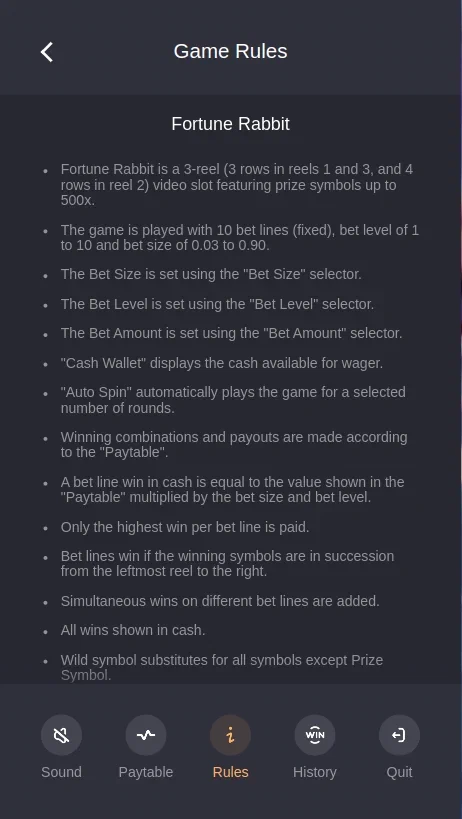
History shows details of previous play. Scroll to the end to load more records or use Custom to select the dates shown. Sound switches audio on and off; Close returns to the main game, and Quit leaves the game. The user-profile control opens the wallet balance and additional settings.
For a first visual orientation, open the Fortune Rabbit demo guide. For the wider rules, return to the game overview. When interpreting the mathematical figures, the RTP explanation separates long-run return from a particular result. A useful practice sequence is to set a stake, spin once, read the result and then open the matching rule screen.